WooCommerce: How To Flip Product Images On Hover

Product images on your WooCommerce website play a significant role in increasing clicks and conversions. In fact, research suggests that 87.6% of customers consider the product image as the key component of their shopping experience.      

Naturally, any consumer who clicks on the product card first sees and goes through the product image. After that, they check for the size availability and read the product description, customer ratings, reviews, or technical specifications. 

While installing WooCommerce will help you with the basic setup of your eCommerce store – with minimal image settings and a simple product gallery, you’ll need to look for better ways to boost your product images. 

So, considering the effective role product images play in eCommerce sales, the question is – how can you maximize their potential and deliver an excellent customer experience? 

One way to do this is through the WooCommerce image swap / flip plugins. These plugins let you add a hover effect on your product images to flip or change them. By doing this, you’ll be able to display additional variations of your products, allow customers to preview products right from the category page and keep customers in your store longer by offering them an enjoyable browsing experience.

The product image swap/flip plugins for WooCommerce help stores in several other ways. But first, let’s understand their importance and get a clear picture of their functionality. 

Continue reading WooCommerce: How To Flip Product Images On Hover

WooCommerce: How to Leverage Instagram to Get More Sales

Once you’ve got your WooCommerce store up and running, the next important step is to promote it – so you can reach your target group and maximize your sales and revenue. 

And Instagram is an excellent platform for businesses like you to showcase their products, different use cases, and customer reviews. 

That’s not it. Whether you’re planning to start an Instagram page for your store or already have one, you can increase the impact of your Instagram content – by using social media feed plugins

Allowing you to display Instagram posts on your website, these plugins take Instagram’s power to highlight your store and products to boost your sales up a notch. 

This article will explore five such plugins that will help you add content from Instagram to your website and use it to its full potential. But first, let’s understand what social media feed plugins do and how they can help you. 

Continue reading WooCommerce: How to Leverage Instagram to Get More Sales

WooCommerce: How To Sell Restaurant Food Online

The COVID-19 pandemic has made millions of restaurants around the globe shut their doors and adapt to a different and much more convenient way of doing business – accelerating the online restaurant ordering system. 

Several third-party services like Uber Eats and Grubhub can help you get your restaurant menu online and take online food orders. However, their downside is that they come with a huge cost – and cut 20-30% from your earnings. Plus, they also come with a lack of control and access over your listing, user-friendliness, and menu design. 

Enter WooCommerce restaurant plugins. 

While the process of setting up your own online food delivery system may seem taxing – WooCommerce restaurant plugins make it easy and affordable with their quick setup, ease of management, and high versatility and customizability.  

Ciao Italia Ristorante, an Italian restaurant in the US, made the most out of WooCommerce Restaurant Ordering Plugin in the pandemic to let their customers order food from their homes and leverage curbside pickup. The plugin allowed them to design a one-page food ordering form – making food ordering and checkout quick and easy for their customers. 

Adam Tracksler, who developed the website, said they launched on day one, and the plugin allowed them to focus on the design and get their restaurant going and website running quickly amidst the pandemic – boosting revenue and saving infrastructure costs. 

Several other restaurants around the globe today use WooCommerce restaurant plugins to offer a comfortable and fast order and checkout process for customers and eliminate the need to pay a major chunk of their hard-earned money to third-party services

Let’s explore some of the best WooCommerce restaurant plugins to help you get 100% of your revenue straight from the customers and boost your business revenue. 

Continue reading WooCommerce: How To Sell Restaurant Food Online

WooCommerce: How to Sell Online Courses

eLearning has become the “new normal” since the pandemic, as the number of course creators has increased and the demand for online learning has expanded.

Compared to one-on-one tutoring, which has an 8-10% retention rate, eLearning has an exceptional retention rate of  25-60%. A significant reason behind this is the control and flexibility it offers people over where, when, how, and what they want to learn. 

If you’re someone who owns an eLearning website, one thing that can make you significantly stand out, get more customers, and drive referrals is – offering the best learning experience to your audience.  

However, it’s not that easy. From building effective courses, and updating modules and lessons to ensuring an excellent and user-friendly interface with round-the-clock customer support – handling everything manually is challenging. 

Enter WooCommerce Learning Management System (LMS) plugins. 

These plugins help you design courses professionally and improve the learning experience through advanced features, functionalities, and customizations that best suit your course and your audience’s needs.

We’ve done the legwork for you and compiled a list of the top four WooCommerce LMS plugins that will help you build and manage your online courses seamlessly, offering a truly immersive learning experience to your audience. But first, let’s quickly understand what WooCommerce LMS plugins are and how they work.

Continue reading WooCommerce: How to Sell Online Courses

WooCommerce: Recover $$$ With a Cart Abandonment Plugin

Imagine having a customer who spends ages looking through your online store, adds several products to their cart – only to abandon the order at the last step. Frustrating, right?

Abandoned carts are a significant problem for eCommerce store owners. In fact, research suggests the average cart abandonment rate is nearly 70%. This means that 7 in 10 customers abandon shopping carts, leading to a loss in sales and revenue for businesses. 

But what if there was a way around this? 

Using WooCommerce abandoned cart recovery plugins, you can engage visitors even after they’ve abandoned their carts and left your store to convert them into customers.

In this article, we’ll explore the best plugins for abandoned cart recovery. But first, let’s understand how these plugins work and why you should use them. 

Continue reading WooCommerce: Recover $$$ With a Cart Abandonment Plugin

WooCommerce Product Search Plugins to Enhance Customer Experience

Say you’re at a clothing store. You know exactly what you want to buy but have to go through the store’s entire catalog to find the product. Sounds like a pointless hassle, right?

Now imagine you had a salesperson to assist you. They’d ask you a few questions – What are you looking for? What’s your budget? What size and color do you want? – and voila, you’ll get just what you wanted. 

This is exactly what a product search feature on your store can do for your customers. 

Product search allows customers to find items they’re looking for faster, improving their experience at your store and increasing the chances of a sale. 

Now, if you have a small WooCommerce store with a handful of products, navigating your website and finding products will be fairly easy. 

But if you offer a wide variety of products spread across categories, product search becomes an essential feature. 

Given its importance, WooCommerce comes with a default search form, which is great for getting started with this feature on your store. However, this form offers only basic features, letting customers search for products mainly by their names. 

For more advanced features – like live search, autocorrection, and providing more relevant results – Woo Product Search plugins can prove to be helpful. 

We’ve done the legwork and compiled a list of some of the best WooCommerce Product Search plugins that can enhance your customers’ shopping experience. Let’s explore them!

Continue reading WooCommerce Product Search Plugins to Enhance Customer Experience

WooCommerce: Save $$$ With Plugin Bundles

When creating and designing an ecommerce store, WooCommerce plugins are an excellent way to add new features and functionalities. But the struggle to find the right, suitable, and affordable plugins can be taxing and time-consuming – especially when there are so many to choose from. 

With such an overwhelming choice of plugins, purchasing and using them individually can get expensive as they often come with subscription fees.

On top of that, using too many plugins from different vendors can cause compatibility issues; not all WooCommerce extensions work flawlessly together, especially from different plugin developers. 

Besides, too many (bloated) plugins can slow down your website and have a negative impact on search engine rankings.

To avoid these issues altogether, some vendors offer “plugin bundles” or “club subscriptions”: with a single subscription you can get access to several, distinct WooCommerce plugins all at once – without compromising your store’s performance and safety or burning a hole in your pocket. 

So, let’s look at the top WooCommerce plugin bundles vendors and see if you can create a fully-functioning ecommerce store with a single purchase.

Continue reading WooCommerce: Save $$$ With Plugin Bundles

WooCommerce: Premium Invoicing Solutions

No matter what products or services you sell, billing and invoicing are integral to every business. 

An invoice contains every important piece of information related to a purchase – from the customer’s details to the due amount and agreed-upon mode of payment – and provides a record of the sale for both you and the customer. 

Besides being a critical accounting and legal requirement, they also help you track the revenue coming from sales, understand buying patterns and plan your inventory accordingly. 

But as important as it is, generating PDF invoices and sending them to every customer manually can be very time-consuming and prone to errors. 

Luckily, there are some excellent plugins in the WooCommerce ecosystem that can streamline and automate the invoice generation process for you. These PDF invoice plugins can create professional-looking, foolproof invoices and send them to customers on your behalf, making your business more systematic and efficient. 

Last week we saw a list of free WooCommerce invoicing pluginsthis time we’ll go through their premium versions, so that you can get a full picture of their full functionalities.

Let’s explore them!

Continue reading WooCommerce: Premium Invoicing Solutions

WooCommerce: How to Offer Advanced Discounts

Offering discounts is a powerful, time-tested strategy to entice customers and boost sales. 

That’s because customers always appreciate a good deal – and helping them save money on products/services they’re interested in is a sure-fire technique to attract them. In fact, nearly 90% of shoppers used a coupon code last year, which shows how much customers value discounts. 

Discounts can also help you bring more traffic to your website, encourage shoppers to buy more, and thus, increase sales and revenue. So, they’re a win for both sides. 

The good news is WooCommerce offers a solid coupon functionality by default to help you create discounts on your store. 

While it’s great to get started, WooCommerce Discount plugins can come in handy for more advanced features like bulk-generating coupons, restricting discounts to specific users, or creating deals like Buy One Get One (BOGO).

This article will explore some plugins that can help you implement a discount strategy on your store in just a few clicks and “woo” your customers. 

Let’s dive in!

Continue reading WooCommerce: How to Offer Advanced Discounts

WooCommerce: How to Build a One-Product Website

Crocs started by selling just foam clogs, and now they’re a billion-dollar company. Casper earned millions selling only mattresses, while Sara Blakely became one of the youngest self-made female billionaires with Spanx, which sold only underclothes initially. 

Can you guess what all these brands have in common? It’s that they started off by selling just one product, built their entire brand around it, and yet became successful. 

Today, most eCommerce businesses sell multiple products – because of the presumption that the more products you offer, the higher chances of converting visitors and making a sale. But from managing operations to inventory, a store with many products comes with its own problems.

On the other hand, selling just one product can streamline your store’s operations and make inventory management and handling orders easy. 

It allows you to focus all your energy and resources on creating, marketing and improving a single product. If done correctly, this can help you build a significant brand value – as people will start associating your store with your flagship product, making you an expert in your market and helping you stand out from your competitors. 

Given its benefits, creating a one-product store is an excellent idea – all you practically need is the right product for your customer’s needs and a solid, easy-to-navigate website. 

Lucky for you, this article will help you with the latter, taking you through all the steps of creating a fantastic WooCommerce website for your one-product store

Let’s begin!

Continue reading WooCommerce: How to Build a One-Product Website

WooCommerce: Top Quick View Plugins

Imagine if your customers didn’t have to visit a separate product page every time they wanted to check out a product. They could see product details right from the page they’re on and avoid going back and forth between the store and product pages

Sounds convenient, right?

This is exactly what a quick view feature on your WooCommerce store can do. 

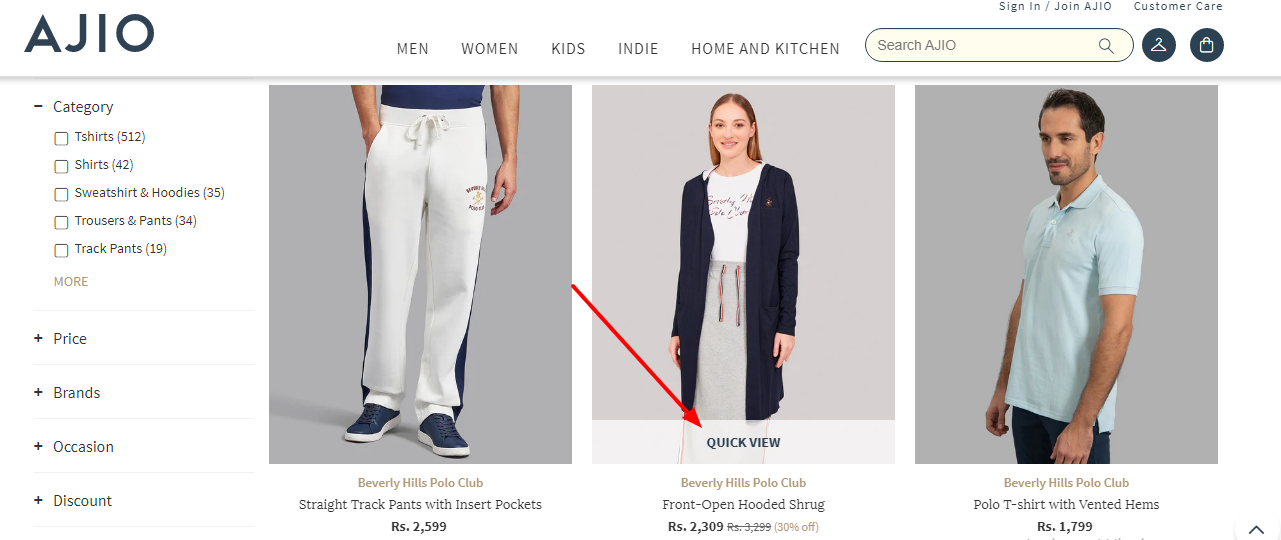
It allows shoppers to view product images, features, and prices from the shop page through a popup window. This way, they can see if they like the product and add it to their cart or simply close the popup and continue browsing items. 

That’s not it. By making product surfing and shopping fast and hassle-free, the quick view feature can also help you improve customer experience and increase your store sales and revenue. 

Although a pretty useful feature, WooCommerce doesn’t have any default settings to enable a quick view button in your store. 

The good news is that there are some great quick view plugins you can use to add this functionality to your shop and optimize it for sales. 

We’ve done the legwork and compiled a list of seven of the best WooCommerce quick view plugins you can use for your online store. Let’s dive in!

Continue reading WooCommerce: Top Quick View Plugins

WooCommerce: Winning With a Cross-Sell Strategy

If you’ve experienced the difficulty and high cost of acquiring new customers, you’re not alone. The estimated probability of selling to a new prospect is only five to 20 percent. Compare that to the probability of selling to an existing customer: 60 to 70 percent.

That’s not all. Depending on your business and your industry, it can be five to 25 times more expensive to acquire a new customer than it is to retain one you already have. That’s despite all your pre-sales preparation.

As you can see, retaining your existing customers – or those who show an intent to buy – is paramount. How to increase revenue from them, however, continues to elude many businesses.

Fortunately, it doesn’t need to be hard. With the help of WooCommerce, you can easily create personalized recommendations to attract more sales from customers who are already interested in your offerings.

Using customized recommendations works to your advantage as internet users have grown fond of personalization. In fact, ninety percent of customers find personalization of their shopping journey appealing, and 71 percent feel at least some frustration when the experience is totally impersonal.

In this post, we’ll take a closer look at cross-selling and its benefits. We’ll also show you how you can create an effective strategy for your online store, using the WooCommerce Added to Cart trigger in MailOptin. Let’s get started!

Continue reading WooCommerce: Winning With a Cross-Sell Strategy

WooCommerce: Why Enable Sliding Cart?

Cart abandonments are a WooCommerce store owner’s worst nemesis – research suggests a whopping 69.8% of customers abandon shopping carts, causing a massive dip in sales and revenue. The same study also revealed that high and unexpected shipping charges, complicated checkout processes, and inability to see the order total are some major reasons behind cart abandonment. 

But what if there were ways you could overcome these problems and increase conversions? 

Well, we already covered a possible solution here, so we’ll add to that today by looking at floating cart plugins. 

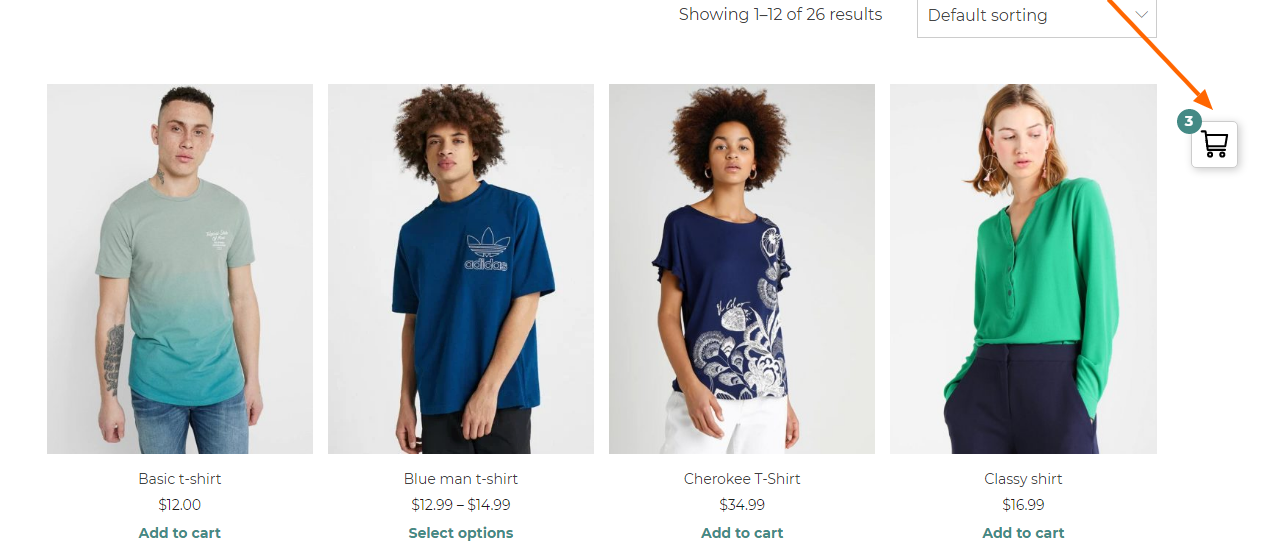
These tools can help your customers view their shopping cart on any page of your WooCommerce store, saving them the back and forth between the page they’re currently on and the WooCommerce cart page. 

Customers can see the items they’ve added to the cart, the order total, shipping costs, and even check out – all without going to another page. This can help smoothen their experience at your store and fasten the buying process, translating into more sales and profits for you.

This article will explore some popular WooCommerce floating cart plugins you can use to leverage this feature on your store. But first, let’s understand how floating carts work and help your online store generate more sales. 

Continue reading WooCommerce: Why Enable Sliding Cart?

WooCommerce: How to Generate Invoices For Free

Running an online store is no easy feat.

You have to take care of order management, inventory, customer relations, production, marketing, and so much more.

A simple business process like invoicing doesn’t seem like it will take too much of your time, but it often ends up doing so.

That is why your best bet is to automate invoice generation. That way, you can attend to the revenue-generating activities that will let you take your business to the next level.

If you run a WooCommerce store, you know it comes with many useful functionalities but not invoicing automation. But the good news is you can choose from many great invoicing plugins available to do the heavy lifting. 

We’ve done the legwork and prepared a list of free WooCommerce invoicing plugins you can use to put your invoice generation on auto-pilot.

Continue reading WooCommerce: How to Generate Invoices For Free

WooCommerce: How to Bulk Edit Product Categories

Using WooCommerce product categories is one of the best ways to help your shoppers find what they need quickly and improve their experience at your store. 

As a store owner, organizing products into categories will improve product discovery and business efficiency by helping you analyze sales and customer buying patterns better. Moreover, it’ll give a structure to your online store, which is a critical aspect of SEO and can help you rank higher in search results. 

These points make a strong case for creating product categories in your store – the good news is that it’s also fairly simple to do this with WooCommerce. 

However, the real struggle begins when you have to edit these categories – adding new products, removing items or overwriting them into a new one for example.

Performing these actions on one or two categories may not hurt, but editing a large number of them individually can be a challenge. 

Luckily, there are multiple ways you can bulk edit your product categories to save on time and boost efficiency. 

In this article, we’ll dive into how you can edit product categories en masse using WooCommerce’s default settings. For more advanced editing options, it’s best to go for plugins – so, we’ll also explore some great plugins you can use for this purpose.

Let’s begin!

Continue reading WooCommerce: How to Bulk Edit Product Categories