
Add Phone Beside the Email @ WooCommerce Registration Form

Close-up of a businessman signing a contract at an office desk.

In a recent Business Bloomer Club Slack thread, a member asked whether it’s possible to add a phone input field next to the email field on the WooCommerce registration form—without modifying the WooCommerce template files.

This is a very common request, especially for store owners who want to collect phone numbers during user registration for order follow-ups, marketing, or support purposes.

So, here’s a detailed and working approach that uses hooks, custom HTML fields, validation, and jQuery—without touching template files at all.

In this post, we’ll break down the full method step by step, explain why it works, and help you implement a similar solution for your WooCommerce store. You’ll also learn about limitations and possible improvements, including using a mini-plugin for cleaner implementation.

Let’s take a look at how this solution works.

Continue reading Add Phone Beside the Email @ WooCommerce Registration Form
Determining Default Variation ID in WooCommerce

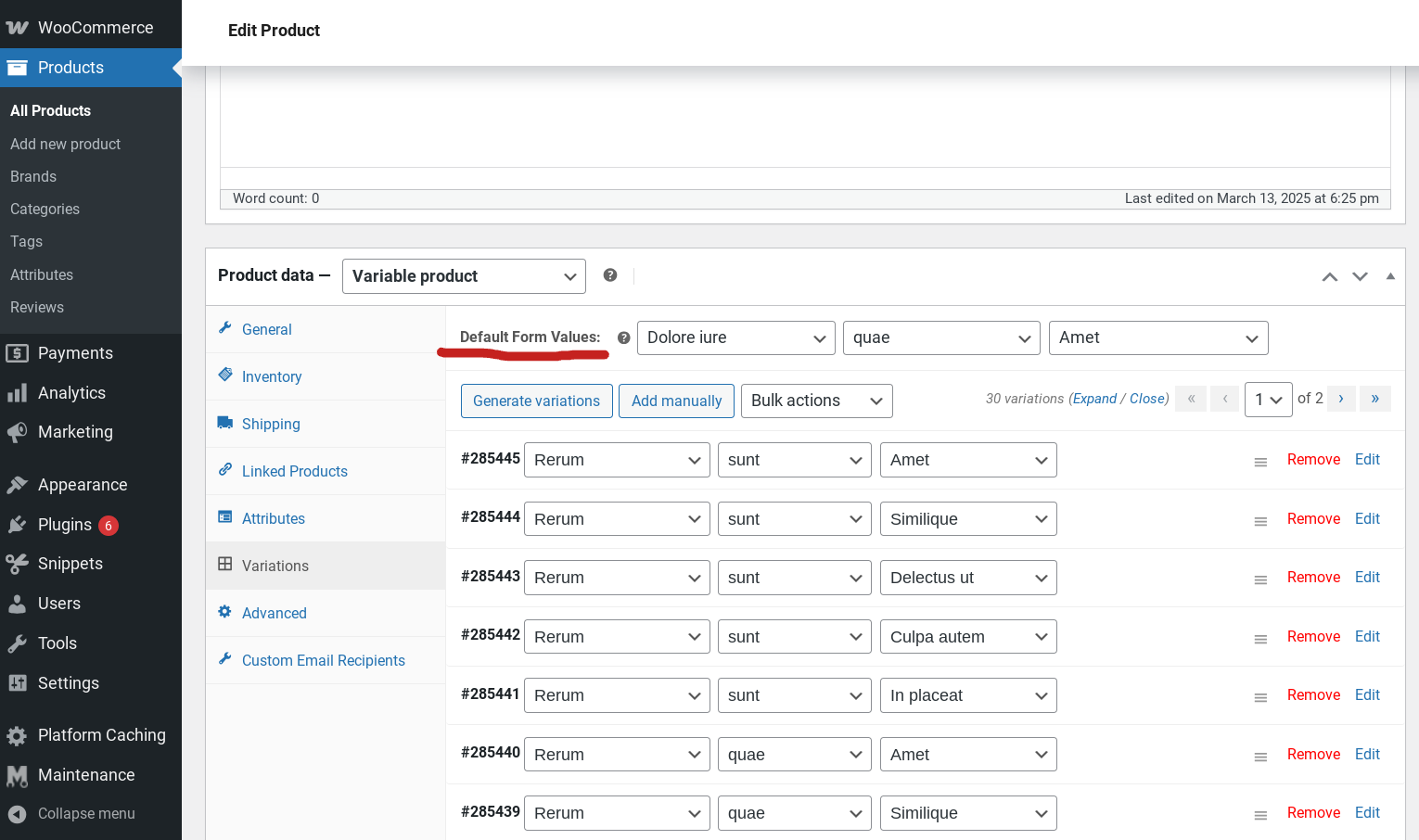
In a recent conversation on the Business Bloomer Club Slack channel, developers explored an interesting challenge: finding the default variation ID from a variable product object using PHP.

They discussed that while WooCommerce readily provides the default attributes with the get_default_attributes() method, converting those defaults into a specific variation ID is not straightforward.

The conversation revealed different approaches, including comparing available variations against default attributes and leveraging WooCommerce’s data store to match the default configuration.

This discussion underscores the flexibility and occasional complexity when customizing WooCommerce products to fit unique requirements.

Continue reading Determining Default Variation ID in WooCommerce

WooCommerce 9.9.3: Performance Gains or Wishful Thinking?

When WooCommerce 9.9 was announced back in May, the headline promised massive admin performance gains, especially for stores with large order volumes.

Smarter caching, async data loading, and leaner queries were meant to make the dashboard snappier and more efficient — with Woo’s own tests showing up to 95% faster admin load times on stores with over a million orders.

Naturally, Business Bloomer Club members were eager to see how these improvements translated to real-world WooCommerce sites — particularly ones with tens of thousands of orders and a variety of third-party plugins.

It didn’t take long for reports to come in, and, as expected, the results were mixed. While some saw notable speedups across admin pages, others discovered that some plugins were actually increasing their query count by the thousands.

So — is Woo 9.9.3 actually faster? It depends.

Continue reading WooCommerce 9.9.3: Performance Gains or Wishful Thinking?

WooCommerce IRL Conference Coming in 2026

A global in-person event for WooCommerce builders is coming. It’s still early days, but the waitlist is live — and 28 people have already signed up.

The announcement of Checkout Summit marks the beginning of something long overdue: a real-life conference dedicated to WooCommerce Makers.

No design frills yet, no date or location confirmed (except that it will take place in Sicily, Italy in 2026) — but the vision is clear. A 2-day event, focused, with speakers and attendees who build for WooCommerce day in, day out.

The goal? One room, 2 days, one topic: WooCommerce. No distractions. No fluff. Just builders helping builders get better at what they do.

Continue reading WooCommerce IRL Conference Coming in 2026

WooCommerce Orders With No Customer and Zero Value

A sleek laptop with a white screen on a desk with green plants in the background.

In a Business Bloomer Club Slack thread, a developer ran into a puzzling WooCommerce issue: orders were appearing in the system with no customer information and a total value of zero.

Even stranger, they were not being spammed in bulk—only one appeared roughly every two weeks, at different times of day. The concern?

These phantom orders were affecting stock levels in a physical store, and the shop owner feared customers might show up with “completed” orders that were never paid for.

Continue reading WooCommerce Orders With No Customer and Zero Value

Does WooCommerce to Shopify Migration Need SEO Work?

A picturesque scene of a flock of birds flying over a lush green field during the day.

In a recent Business Bloomer Club Slack thread, members discussed the SEO implications of moving an online store from WooCommerce to Shopify.

The main takeaway is that migrating from WooCommerce to Shopify is not just a simple platform switch — it also involves significant SEO considerations, especially because the URL structures between the two platforms differ substantially.

This post explores why SEO work is essential during such migrations, what common pitfalls to avoid, and how to minimize the risk of losing organic rankings and traffic.

Continue reading Does WooCommerce to Shopify Migration Need SEO Work?

WooCommerce Customer Lookup Table and Slow Admin Orders

A person organizing wooden drawers in an archive room with a focus on storage.

In a recent Business Bloomer Club Slack thread, a developer encountered a frustrating issue while editing WooCommerce orders from the WordPress admin.

The website, recently migrated from an outdated version and updated with all the latest plugins, was running fine—until it came to editing orders.

The admin page would hang indefinitely unless the wc_customer_lookup table was cleared. With over 500,000 orders in the system, this prompted a deeper look into WooCommerce lookup tables and how they affect performance.

Continue reading WooCommerce Customer Lookup Table and Slow Admin Orders

WooCommerce Get Product Attribute IDs with WPML

jam, fruit jar, label, fruit, jam, jam, jam, jam, label, label, label, label, label

In a recent Business Bloomer Club Slack thread, a developer was struggling to retrieve attribute IDs from WooCommerce product variations—something made more complex by the use of WPML and the Show Single Variations plugin by Iconic.

While getting the attribute slug was straightforward, converting that into a term ID or accessing the actual attribute ID for translated products wasn’t working as expected.

With multiple workarounds tested and a fair amount of debugging, the solution ended up being a mix of PHP functions and a deeper understanding of how WPML interacts with variable products and their translations. Here’s how it all unfolded.

Continue reading WooCommerce Get Product Attribute IDs with WPML

WooCommerce Hide Featured Image, Keep Product Gallery

Close-up of hands typing on a laptop with an image gallery open on the screen.

In a recent Business Bloomer Club Slack thread, a member asked how to create a product image layout that uses four images in a grid, instead of the default single featured image.

The idea was to unhook the featured image and rely solely on the product gallery to show multiple thumbnails, mimicking a tiled layout. This turned into a technical discussion on WooCommerce’s image handling, where things got tricky due to the JavaScript-driven gallery system.

Here’s what we discovered—along with code snippets and tips that could help if you want to experiment with a similar layout change.

Continue reading WooCommerce Hide Featured Image, Keep Product Gallery

WooCommerce Block Theme: Aiming to Replace Storefront?

purple, nature, sunset, darling, see, clouds

In a recent Business Bloomer Club Slack thread, members reacted to a new announcement from WooCommerce about their upcoming “Woo Block Theme” — a next-generation block-based theme meant to modernize store design and functionality.

According to Woo’s developer blog, the new theme will offer a fast, modern experience fully built on Full Site Editing (FSE), which is now considered the future of WordPress theming.

This initiative seems aimed at replacing Storefront, WooCommerce’s official theme since 2014. But that’s no small challenge. While Storefront is showing its age in terms of design and layout, it’s still regarded as the safest default: stable, lean, commerce-ready, and built with Woo’s own priorities in mind.

The conversation among Club members touched on the GitHub preview, current limitations, what store owners really want, and whether the new theme can strike the right balance between simplicity and control — the very thing that made WooCommerce appealing in the first place.

Continue reading WooCommerce Block Theme: Aiming to Replace Storefront?

WooCommerce Zoom Chat Shares New Marketing Direction

In a recent Business Bloomer Club Slack thread, members reacted to WooCommerce’s latest Developer Chat, which unlike the usual blog recaps or Slack threads was held on Zoom for the first time.

The format shift came as a surprise to many, sparking questions about accessibility and follow-ups. A few Club members were able to attend and later shared their impressions, while others asked whether a recording or official summary would be made available (here’s the recap post).

The chat focused on Woo’s evolving marketing strategy and brand positioning. There was talk of increased transparency, renewed focus on monetization from larger merchants, and plans to tackle total cost of ownership in future campaigns.

But it also raised some concerns — especially among plugin developers — about Woo’s alignment with those running lower-priced or niche extensions. Below is a breakdown of what was shared and what it might mean for WooCommerce developers and businesses.

Continue reading WooCommerce Zoom Chat Shares New Marketing Direction

How I Ditched a WooCommerce Plugin for My Own Code

Premium WooCommerce plugins are great — until you realize you’re only using 10% of the features, while still loading all the code, dealing with updates, and paying for a license you don’t fully need.

That’s exactly what happened to me. One of my plugins was doing a job I could replicate with a few custom functions. So I decided to ditch it and replace it with my own code — lightweight, specific, and built just for my store.

But I didn’t just jump into coding blindly. I documented the whole process in a 3-part YouTube series, from scoping the replacement, to prompting an AI for help, to testing the final result on a dev store.

In this post, I’ll summarize the approach, share key takeaways from each step, and help you decide when it makes sense to build instead of buy — especially if you’re comfortable writing WooCommerce snippets.

Continue reading How I Ditched a WooCommerce Plugin for My Own Code

WooCommerce and WordPress Multisite: Is It Worth It?

Vibrant display of colorful umbrellas suspended outdoors, creating a lively atmosphere.

In a recent Business Bloomer Club Slack thread, a member raised an important question: how well does WooCommerce work within a WordPress multisite setup?

The discussion that followed uncovered some strong opinions, practical advice, and real-world experience from developers who’ve used (and struggled with) multisite.

If you’re currently running WooCommerce inside a multisite, or considering it, this post explores the pros, cons, and technical hurdles you might encounter—especially when it comes to staging, debugging, and local development.

Continue reading WooCommerce and WordPress Multisite: Is It Worth It?

Is Core Web Vitals Optimization Worth It for WooCommerce?

Detailed close-up of a hand pointing at colorful charts with a blue pen on wooden surface.

In a recent Business Bloomer Club Slack thread, we discussed the impact of Core Web Vitals optimization on website performance and SEO.

Some store owners have invested in optimizing Core Web Vitals but saw little to no improvement in their site’s performance or search ranking.

This raised questions about the real-world benefits of focusing on Core Web Vitals, especially for WooCommerce stores of different sizes and with varying technical setups.

The discussion also touched on how perceived page speed, especially the “above the fold” content load time, might have more influence than overall metrics.

In this post, we’ll explore whether optimizing Core Web Vitals is always a critical task and what factors store owners should consider to get the most value from their efforts.

Continue reading Is Core Web Vitals Optimization Worth It for WooCommerce?

WooCommerce: Efficient Purchase Order Processing

Three cardboard boxes on a dolly, ready for shipping outside a warehouse.

For businesses that handle a large volume of purchase orders (POs), manually entering order information into WooCommerce can be a significant bottleneck. Repetitive data entry, especially for repeat customers, is not only time-consuming but also prone to errors.

This post explores strategies for automating the process of creating WooCommerce orders from POs, focusing on how to capture all relevant customer data, including billing and shipping addresses, and associate it with a customer account for future use.

We’ll examine various approaches, from leveraging order duplication features to exploring custom development options and integrating with CRM systems. The goal is to help businesses streamline their order processing workflow, reduce manual effort, and improve accuracy, ultimately freeing up valuable time and resources to focus on other critical aspects of the business.

This involves not only efficiently creating orders but also ensuring that customer data is captured and managed effectively for repeat business.

Continue reading WooCommerce: Efficient Purchase Order Processing